If you’re setting up Docker on Ubuntu 24.04 LTS and you’re using an Intel Adler Lake NUC processor that has the integrated i915 graphics, you might run into an error when you try adding /dev/dri:/dev/dri to your devices in a Docker container. While trying to run cd /dev/dri in your terminal, you might be met with a Directory Does Not Exist error. If you run the lshw -c video command, it should list configuration: driver=i915. If it doesn’t, this article might help you resolve the issue.
How to Add i915 Drivers to Ubuntu for Docker and /dev/dri
The issue is compatibility with your hardware and your Linux kernel. Ubuntu provides an HWE (Hardware Enablement Stack) that you can install, which adds some of the newer hardware drivers to the kernel.
First, you’ll want to update your packages with:
sudo apt update
Then you’ll want to install the HWE package for your version of Ubuntu. As of this article, the current LTS version is 24.04.x. The minor version doesn’t matter as long as you’re on a 24.04.x version.
sudo apt install --install-recommends linux-generic-hwe-24.04
After this successfully installs, restart your system.
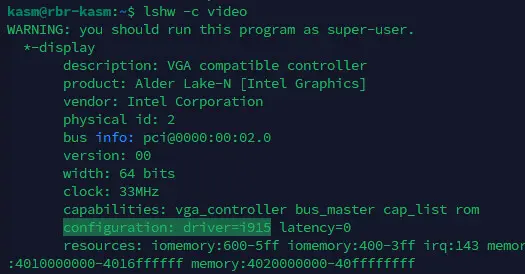
Now when you run lshw -c video, you should see the driver listed like the image below:
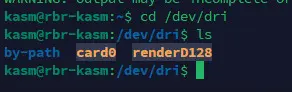
Also, if you cd /dev/dri and ls, you should see some files:
Now you should be able to successfully pass the device /dev/dri:/dev/dri into your Docker containers.